概述
链上监控大型 token 的移动,通常被称为“巨鲸”活动,可以为市场情绪和潜在的价格行为提供有价值的见解。
本指南将引导你为 Hyperliquid 区块链上的 HYPE token 创建一个实时巨鲸警报机器人。你将构建一个系统,不仅可以检测大型转账,还可以通过 HyperCore 获取的实时美元价格来丰富数据,并将即时通知发送到 Telegram 频道。为了实现这一点,我们将利用 QuickNode Webhooks 的强大功能和效率。
你将要做什么
- 创建一个 QuickNode Webhook,从 Hyperliquid EVM 过滤 HYPE
Transfer事件 - 在处理前使用 HMAC 签名验证 payload 的真实性
- 通过 HyperEVM 预编译从 HyperCore 读取 HYPE 现货 价格
- 向 Telegram 频道发送分级的巨鲸警报(小鱼、海豚、巨鲸)
你将需要什么
- 一个带有 Hyperliquid EVM endpoint 的 QuickNode 账户
- Node.js 20+,npm(或其他包管理器)以及像 VS Code 这样的代码编辑器
- 一个 Telegram 账户 (如果你希望构建一个 Telegram 机器人的话)
- JavaScript 的基础知识
- 一种将你的本地服务器暴露给互联网的工具,例如 ngrok 或 localtunnel(如果你需要在本地测试 webhook 的话)
为什么选择 QuickNode Webhooks?
QuickNode Webhooks 在“推送”模型上运行。Webhooks 不是让你重复地向区块链请求新数据(轮询),而是为你监视链,并在事件发生时将相关数据推送到你的应用程序。
这种方法非常有效,提供了几个关键优势:
- 实时数据:立即收到通知,而无需轮询周期的延迟。
- 减少开销:使你无需管理复杂且资源密集型的轮询基础设施。
- 强大的过滤功能:在 QuickNode 端处理和过滤数据,因此你的服务器仅接收所需的精确信息。
- 成本效益:仅按交付的事件付费,使其成为实时数据监控的经济高效的解决方案。
巨鲸警报机器人项目
巨鲸警报机器人由几个相互连接的组件组成,这些组件协同工作以提供实时通知:
Hyperliquid 区块链:当发生转账时,会发出 HYPE token 的
Transfer事件 (Transfer(address,address,uint256))。带有过滤功能的 QuickNode Webhooks:Webhook 不断监视链,并根据我们定义的过滤函数捕获此事件。
Webhook 交付:QuickNode 通过安全的 POST 请求将过滤后的 payload 发送到我们的服务器 endpoint。
Node.js 服务器:我们的服务器接收数据,使用 webhook 的安全 token 验证其真实性,并对其进行处理。
价格获取:服务器调用 Hyperliquid 上的 HyperCore 预编译合约以获取 HYPE 的当前美元价格。
Telegram 机器人:最后,服务器格式化一个内容丰富,可读的消息,并使用 Telegram 机器人 API 将警报发送到我们指定的频道。

这是我们将要实现的端到端事件流。现在,让我们开始构建 Hyperliquid 巨鲸警报机器人。
步骤 1:创建你的 Telegram 机器人和频道
首先,你需要一个 Telegram 机器人和一个可以发布警报的频道。
使用 BotFather 创建机器人
- 打开 Telegram 并搜索 BotFather。
- 开始与 BotFather 聊天并使用命令
/newbot创建一个新机器人。 - 按照提示为你的机器人设置名称和用户名。
- BotFather 将为你提供一个机器人 Token。安全地保存此 token;你需要在
.env文件中使用它。
创建频道
- 在 Telegram 中,创建一个新频道。你可以将其设为公开或私有。
- 对于公共频道,为其提供一个令人难忘的用户名(例如,@hyperliquid_whales)。此用户名是你的
TELEGRAM_CHANNEL_ID。 - 对于私有频道,你将需要其数字聊天 ID。你可以通过将频道中的消息转发到像
@JsonDumpCUBot这样的机器人来获取此 ID,并检查它提供的聊天 ID(即forward_from_chat.id)。
将你的机器人添加到频道
- 打开你新创建的频道的设置。
- 添加你的机器人并使其成为管理员。
现在你有了 TELEGRAM_BOT_TOKEN 和 TELEGRAM_CHANNEL_ID。
步骤 2:创建你的 QuickNode Hyperliquid EVM Endpoint
现在,创建你的 QuickNode Hyperliquid EVM endpoint,该 endpoint 将用于与 Hyperliquid Core 交互以获取 HYPE 价格数据。
首先,你需要一个 QuickNode 账户。如果已经有,只需登录。进入 QuickNode 仪表板后:
- 导航到 Endpoints 页面
- 单击 New Endpoint 按钮
- 选择 Hyperliquid EVM Mainnet 网络
- 创建你的 endpoint
创建 endpoint 后,复制你的 endpoint URL 并将其放在手边。你需要在后面的步骤中将其添加到你的 .env 文件中。
步骤 3:创建你的 QuickNode Webhook
现在,让我们设置将监视 Hyperliquid 区块链的 QuickNode Webhook。
创建 Webhook
- 转到 QuickNode 仪表板,然后导航到 Webhooks 部分。
- 单击 Create Webhook 并选择 Hyperliquid EVM Mainnet 作为区块链。
- 选择 Start with a custom filter 以创建自定义过滤器。
定义你的自定义过滤器
QuickNode 为常见用例提供了几个 预定义的过滤器模板。在本指南中,我们将创建一个自定义 JavaScript 函数来实现我们的分级警报逻辑。
我们将使用的函数检查每个新区块中的每个交易。它专门查找与标准 ERC20 Transfer 签名 (0xddf252ad1be2c89b69c2b068fc378daa952ba7f163c4a11628f55a4df523b3ef) 匹配并来自 HYPE token 合约的事件日志。对于 Transfer 事件,topics 数组包含发送者和接收者,而 log.data 包含金额。我们的代码解码此信息,对照我们的阈值检查金额,并且仅当转账足够大时才返回干净的数据 payload。这种预处理非常有效,可确保我们的服务器不会将资源浪费在不相关的数据上。
在函数框中,粘贴以下代码:
// QuickNode Stream Filter for Tiered Wrapped HYPE Token Transfers // QuickNode 流过滤器,用于分级包装的 HYPE Token 转账 function main(payload) { // --- Configuration --- // --- 配置 --- // The specific token contract address for Wrapped HYPE // 包装的 HYPE 的特定 token 合约地址 const WHYPE_ADDRESS = "0x5555555555555555555555555555555555555555"; // Define the thresholds for each tier (with 18 decimals) // 定义每个级别的阈值(带有 18 位小数) const TIER_THRESHOLDS = { whale: BigInt("10000000000000000000000"), // 10,000 HYPE dolphin: BigInt("5000000000000000000000"), // 5,000 HYPE small_fish: BigInt("1000000000000000000000"), // 1,000 HYPE }; // --- Static Data --- // --- 静态数据 --- const TRANSFER_SIGNATURE = "0xddf252ad1be2c89b69c2b068fc378daa952ba7f163c4a11628f55a4df523b3ef"; const { data } = payload; const block = data[0].block; const receipts = data[0].receipts || []; const categorizedTransfers = []; const blockNumber = parseInt(block.number, 16); const blockTimestamp = parseInt(block.timestamp, 16); for (const receipt of receipts) { for (const log of receipt.logs || []) { // Primary filter: Is this a Transfer event from the W-HYPE contract? // 主要过滤器:这是来自 W-HYPE 合约的 Transfer 事件吗? if ( log.address.toLowerCase() === WHYPE_ADDRESS && log.topics[0] === TRANSFER_SIGNATURE ) { const transferValue = BigInt(log.data); let tier = null; // Tiering Logic: Check from the highest threshold down to the lowest. // 分级逻辑:从最高阈值往下检查到最低阈值。 if (transferValue >= TIER_THRESHOLDS.whale) { tier = "whale"; } else if (transferValue >= TIER_THRESHOLDS.dolphin) { tier = "dolphin"; } else if (transferValue >= TIER_THRESHOLDS.small_fish) { tier = "small_fish"; } // If the transfer meets any of our thresholds, process it. // 如果转账满足我们的任何阈值,请对其进行处理。 if (tier) { const fromAddress = "0x" + log.topics[1].slice(26); const toAddress = "0x" + log.topics[2].slice(26); categorizedTransfers.push({ tier: tier, tokenContract: log.address, from: fromAddress, to: toAddress, value: transferValue.toString(), transactionHash: receipt.transactionHash, blockNumber: blockNumber, timestamp: blockTimestamp, }); } } } } if (categorizedTransfers.length > 0) { return { largeTransfers: categorizedTransfers, }; } return null; } 测试你的过滤器
选择一个区块(例如 12193297)来测试你的过滤器条件并验证是否正确触发了警报。你应该看到一个包含分类转账的 payload,如下所示:
{ "largeTransfers": [\ {\ "blockNumber": 12193297,\ "from": "0x7c97cd7b57b736c6ad74fae97c0e21e856251dcf",\ "tier": "small_fish",\ "timestamp": 1756245832,\ "to": "0xaaa2851ec59f335c8c6b4db6738c94fd0305598a",\ "tokenContract": "0x5555555555555555555555555555555555555555",\ "transactionHash": "0xafe522067fca99d4b44030d82885cabb757943255b991b3f2e95564807dbe0f7",\ "value": "2200000000000000000000"\ }\ ] } 获取安全 Token 并设置 Webhook URL
QuickNode 将自动生成一个 安全 Token 以验证传入请求是否真实。将此 token 复制到你的 .env 文件中作为 WEBHOOK_SECRET 变量的值。
对于 Webhook URL,你需要一个可公开访问的 endpoint。在开发过程中,你可以使用 ngrok 或 localtunnel 来暴露你的本地服务器。你可以运行 ngrok http 3000(假设你的服务器在端口 3000 上运行),并在服务器运行后复制 HTTPS 转发 URL。请记住将 /webhook 附加到其上(例如,https://your-ngrok-id.ngrok.io/webhook),因为这是你将构建 webhook 监听器的地方。
由于我们的服务器尚未构建,我们将在此处暂停,并在构建服务器后返回以测试和激活 Webhook。
步骤 4:构建 Webhook 服务器
现在,让我们创建 Node.js 应用程序,该应用程序将接收和处理来自我们的 webhook 的数据。
项目设置和依赖项
首先,为你的项目创建一个目录并安装必要的依赖项。你可以使用 npm 或任何其他包管理器(例如 yarn、pnpm、bun)来执行此操作。例如:
mkdir hyperliquid-whale-alert-bot && cd hyperliquid-whale-alert-bot npm init -y npm i express dotenv node-telegram-bot-api viem npm i -D nodemon 然后,更新你的 package.json 以包含以下内容:
"type": "module", "scripts": { "start": "node index.js", "dev": "nodemon index.js" } 项目结构
创建以下文件以获得项目的基本结构:
├── config.js // Configuration settings ├── index.js // Main entry point ├── priceService.js // Price-related logic ├── security.js // Security-related logic ├── telegramService.js // Telegram bot integration └── .env // Environment variables └── .gitignore // Git ignore file 以下是可以在终端中运行以立即创建所有这些文件的一行命令:
touch config.js index.js priceService.js security.js telegramService.js .env .gitignore ## If touch command is not available, you can use: ## 如果 touch 命令不可用,你可以使用: ## (echo > config.js) && (echo > index.js) && (echo > priceService.js) && (echo > security.js) && (echo > telegramService.js) && (echo > .env) && (echo > .gitignore) 环境变量
更新项目根目录中的 .env 文件以存储你的环境变量。添加以下变量:
## Telegram Configuration # Telegram 配置 TELEGRAM_BOT_TOKEN=your_telegram_bot_token TELEGRAM_CHANNEL_ID=your_channel_id ## Server Configuration # 服务器配置 PORT=3000 ## Webhook Security # Webhook 安全性 WEBHOOK_SECRET=your_optional_webhook_secret ## QuickNode Configuration for Hyperliquid EVM RPC # Hyperliquid EVM RPC 的 QuickNode 配置 HYPERLIQUID_RPC=https://your-endpoint.quiknode.pro/your-token/ ## Environment # 环境 NODE_ENV=development 代码实现
.gitignore
重要的是在你的项目中添加一个 .gitignore 文件,以避免提交敏感信息和不必要的文件。在你的项目根目录中创建一个 .gitignore 文件并添加以下行:
node_modules .env config.js
此文件包含你的应用程序的配置设置,包括环境变量和其他常量。
现货 价格预编译位于 0x...0808,而 oracle 价格预编译位于 0x...0807。你可以根据你的价格来源使用其中任何一个;本指南使用 现货。始终在官方文档和最新的指南中确认地址。
import dotenv from "dotenv"; // Load environment variables // 加载环境变量 dotenv.config(); export const TIERS = { whale: { emoji: "🐋", label: "WHALE", }, dolphin: { emoji: "🐬", label: "DOLPHIN", }, small_fish: { emoji: "🐟", label: "FISH", }, }; export const EXPLORER = { tx: "https://hypurrscan.io/tx/", address: "https://hypurrscan.io/address/", block: "https://hypurrscan.io/block/", }; export const HYPERCORE = { SPOT_PX_PRECOMPILE: "0x0000000000000000000000000000000000000808", HYPE_SPOT_INDEX: 107, // Mainnet HYPE spot ID // Mainnet HYPE 现货 ID RPC_URL: process.env.HYPERLIQUID_RPC || "https://api.hyperliquid.xyz/evm", }; export const MESSAGE_DELAY_MS = 1000; // Delay between Telegram messages // Telegram 消息之间的延迟 export const PORT = process.env.PORT || 3000; priceService.js
此服务负责从 HyperCore 获取 HYPE 价格。
我们将使用 32 字节 ABI 编码的索引直接调用 SPOT 价格预编译。预编译返回一个 uint64,其中小数缩放取决于资产的 szDecimals(Hyperliquid 的价格系统)。
// priceService.js // Fetches HYPE price from HyperCore using precompile // 使用预编译从 HyperCore 获取 HYPE 价格 import { createPublicClient, http, encodeAbiParameters, formatUnits } from "viem"; import { HYPERCORE } from "./config.js"; // Create viem client for HyperEVM // 为 HyperEVM 创建 viem 客户端 const client = createPublicClient({ transport: http(HYPERCORE.RPC_URL), }); // Cache price for 30 seconds to avoid excessive RPC calls // 缓存价格 30 秒以避免过多的 RPC 调用 let priceCache = { price: null, timestamp: 0, }; const CACHE_DURATION = 30000; // 30 seconds /** * Fetches HYPE spot price from HyperCore precompile * 从 HyperCore 预编译获取 HYPE 现货价格 * Price is returned with 6 decimals precision for HYPE * 价格以 6 位小数的精度返回给 HYPE * Details: To convert to floating point numbers, divide the returned price by 10^(8 - base asset szDecimals) for spot * 细节:要转换为浮点数,请将返回的价格除以 10^(8 - 基础资产 szDecimals)(现货) * Source: https://hyperliquid.gitbook.io/hyperliquid-docs/for-developers/hyperevm/interacting-with-hypercore * 来源:https://hyperliquid.gitbook.io/hyperliquid-docs/for-developers/hyperevm/interacting-with-hypercore * @returns {Promise<number|null>} HYPE price in USD * @returns {Promise<number|null>} 美元的 HYPE 价格 */ export async function getHypePrice() { try { // Check cache first // 首先检查缓存 if ( priceCache.price && Date.now() - priceCache.timestamp < CACHE_DURATION ) { console.log("Using cached HYPE price:", priceCache.price); return priceCache.price; } // Encode the spot index as a uint32 parameter // 将现货指数编码为 uint32 参数 const encodedIndex = encodeAbiParameters( [{ name: "index", type: "uint32" }], [HYPERCORE.HYPE_SPOT_INDEX] ); // Call the spot price precompile // 调用现货价格预编译 const result = await client.call({ to: HYPERCORE.SPOT_PX_PRECOMPILE, data: encodedIndex, }); // szDecimals for HYPE is 2. // HYPE 的 szDecimals 为 2。 const szDecimals = 2; const priceRaw = BigInt(result.data); const price = formatUnits(priceRaw, 8 - szDecimals); // Convert to decimal string // 转换为小数字符串 // Update cache // 更新缓存 priceCache = { price, timestamp: Date.now(), }; console.log(`Fetched HYPE price from HyperCore: $${price}`); return price; } catch (error) { console.error("Error fetching HYPE price from HyperCore:", error); // Return cached price if available, otherwise null // 如果缓存价格可用,则返回缓存价格,否则返回 null return priceCache.price || null; } } /** * Formats USD value based on HYPE amount and price * 根据 HYPE 数量和价格格式化美元价值 * @param {string} hypeAmount - HYPE amount as string * @param {number} hypePrice - HYPE price in USD * @returns {string} Formatted USD value */ export function formatUSD(hypeAmount, hypePrice) { if (!hypePrice) return ""; const usdValue = parseFloat(hypeAmount) * hypePrice; return `($${usdValue.toLocaleString("en-US", { minimumFractionDigits: 0, maximumFractionDigits: 0, })})`; } security.js
此模块包含验证传入 webhook 的逻辑。QuickNode 建议使用 headers X-QN-Nonce、X-QN-Timestamp 和 X-QN-Signature 进行 HMAC 验证,并且此模块实现了该验证。
有关 QuickNode 的 webhook 安全性的更多详细信息,请参阅 验证流签名 指南。由于 Webhooks 和 Streams 共享相同的基础架构,因此相同的原则适用。
// security.js // Validates incoming webhook signatures from QuickNode // 验证来自 QuickNode 的传入 webhook 签名 import crypto from "crypto"; /** * Validates the webhook signature from QuickNode * 验证来自 QuickNode 的 webhook 签名 * Based on QuickNode's HMAC-SHA256 signature validation * 基于 QuickNode 的 HMAC-SHA256 签名验证 * * @param {string} secretKey - The webhook secret key * @param {string} payload - The request body as string * @param {string} nonce - The nonce from headers * @param {string} timestamp - The timestamp from headers * @param {string} givenSignature - The signature from headers * @returns {boolean} Whether the signature is valid * @returns {boolean} 签名是否有效 */ export function validateWebhookSignature( secretKey, payload, nonce, timestamp, givenSignature ) { if (!secretKey || !nonce || !timestamp || !givenSignature) { console.warn("⚠️ Missing required parameters for signature validation"); return false; } try { // Concatenate nonce + timestamp + payload as strings // 将 nonce + 时间戳 + payload 连接为字符串 const signatureData = nonce + timestamp + payload; // Convert to bytes // 转换为字节 const signatureBytes = Buffer.from(signatureData); // Create HMAC with secret key converted to bytes // 使用转换为字节的密钥创建 HMAC const hmac = crypto.createHmac("sha256", Buffer.from(secretKey)); hmac.update(signatureBytes); const computedSignature = hmac.digest("hex"); // Use timing-safe comparison to prevent timing attacks // 使用时间安全比较来防止时间攻击 const isValid = crypto.timingSafeEqual( Buffer.from(computedSignature, "hex"), Buffer.from(givenSignature, "hex") ); if (isValid) { console.log("✅ Webhook signature validated successfully"); } else { console.error("❌ Invalid webhook signature"); } return isValid; } catch (error) { console.error("Error validating webhook signature:", error); return false; } } /** * Middleware for Express to validate webhook signatures * 用于 Express 的中间件,用于验证 webhook 签名 * QuickNode sends nonce, timestamp, and signature in headers * QuickNode 在标头中发送 nonce、时间戳和签名 */ export function webhookAuthMiddleware(req, res, next) { // Skip validation if no secret is configured // 如果未配置密钥,则跳过验证 const secretKey = process.env.WEBHOOK_SECRET; if (!secretKey) { console.log("ℹ️ Webhook secret not configured, skipping validation"); return next(); } // Get QuickNode headers // 获取 QuickNode 标头 const nonce = req.headers["x-qn-nonce"]; const timestamp = req.headers["x-qn-timestamp"]; const givenSignature = req.headers["x-qn-signature"]; if (!nonce || !timestamp || !givenSignature) { console.error("🚫 Missing required QuickNode headers"); return res.status(400).json({ error: "Missing required headers", message: "x-qn-nonce, x-qn-timestamp, and x-qn-signature headers are required", }); } // Get the raw body as string // 以字符串形式获取原始 body // Note: Express's JSON middleware already parsed the body, so we need to stringify it back // 注意:Express 的 JSON 中间件已经解析了 body,因此我们需要将其字符串化 const payloadString = JSON.stringify(req.body); // Validate the signature // 验证签名 const isValid = validateWebhookSignature( secretKey, payloadString, nonce, timestamp, givenSignature ); if (!isValid) { console.error("🚫 Webhook validation failed"); return res.status(401).json({ error: "Invalid signature", message: "The webhook signature could not be validated", }); } next(); } telegramService.js
此模块格式化最终消息并将其发送到你的 Telegram 频道。
// telegramService.js // Handles Telegram bot messaging // 处理 Telegram 机器人消息传递 import TelegramBot from "node-telegram-bot-api"; import { formatEther } from "viem"; import { TIERS, EXPLORER, MESSAGE_DELAY_MS } from "./config.js"; import { getHypePrice, formatUSD } from "./priceService.js"; // Initialize Telegram bot // 初始化 Telegram 机器人 const bot = new TelegramBot(process.env.TELEGRAM_BOT_TOKEN, { polling: false }); const CHANNEL_ID = process.env.TELEGRAM_CHANNEL_ID; /** * Format an address for display * 格式化要显示的地址 */ function formatAddress(address) { return `${address.slice(0, 6)}...${address.slice(-4)}`; } /** * Format transaction hash for display * 格式化要显示的交易哈希 */ function formatTxHash(hash) { return `${hash.slice(0, 10)}...`; } /** * Display time * 显示时间 */ function getTime(timestamp) { const date = new Date(timestamp * 1000); return date.toLocaleString("en-US"); } /** * Create formatted Telegram message for a transfer * 为转移创建格式化的 Telegram 消息 */ async function createMessage(transfer) { const tierConfig = TIERS[transfer.tier]; const formattedValue = formatEther(BigInt(transfer.value)); const hypePrice = await getHypePrice(); const usdValue = formatUSD(formattedValue, hypePrice); // Create message with Markdown formatting // 使用 Markdown 格式创建消息 const message = ` ${tierConfig.emoji} **${tierConfig.label} ALERT** ${tierConfig.emoji} 💰 **Amount:** \`${parseFloat(formattedValue).toLocaleString("en-US", { maximumFractionDigits: 2, })} HYPE\` ${usdValue} 📤 **From:** [${formatAddress(transfer.from)}](${EXPLORER.address}${ transfer.from }) 📥 **To:** [${formatAddress(transfer.to)}](${EXPLORER.address}${transfer.to}) 🔗 **TX:** [${formatTxHash(transfer.transactionHash)}](${EXPLORER.tx}${ transfer.transactionHash }) 📦 **Block:** [#${transfer.blockNumber}](${EXPLORER.block}${transfer.blockNumber}) ⏰ **Time:** ${getTime(transfer.timestamp)} Powered by Hyperliquid & QuickNode Webhooks`; return message; } /** * Send message to Telegram with retry logic * 使用重试逻辑将消息发送到 Telegram */ export async function sendMessage(message, retries = 3) { for (let i = 0; i < retries; i++) { try { await bot.sendMessage(CHANNEL_ID, message, { parse_mode: "Markdown", disable_web_page_preview: true, }); console.log("✅ Message sent to Telegram successfully"); return true; } catch (error) { console.error(`❌ Telegram send attempt ${i + 1} failed:`, error.message); if (i < retries - 1) { // Wait before retrying (exponential backoff) // 在重试之前等待(指数退避) await new Promise((resolve) => setTimeout(resolve, 1000 * Math.pow(2, i)) ); } } } return false; } /** * Process and send alerts to Telegram * 处理警报并将其发送到 Telegram */ export async function processAlerts(transfers) { console.log(`📨 Processing ${transfers.length} transfers for Telegram...`); for (const transfer of transfers) { const message = await createMessage(transfer); const sent = await sendMessage(message); if (!sent) { console.error( "Failed to send message for transfer:", transfer.transactionHash ); } // Rate limiting between messages // 消息之间的速率限制 if (transfers.indexOf(transfer) < transfers.length - 1) { await new Promise((resolve) => setTimeout(resolve, MESSAGE_DELAY_MS)); } } // Send summary if there are multiple transfers // 如果有多个转移,请发送摘要 if (transfers.length > 3) { const summaryMessage = ` 📊 **Batch Summary** Total transfers: ${transfers.length} 🐋 Whales: ${transfers.filter((t) => t.tier === "whale").length} 🐬 Dolphins: ${transfers.filter((t) => t.tier === "dolphin").length} 🐟 Fish: ${transfers.filter((t) => t.tier === "small_fish").length} Block: #${transfers[0].blockNumber} `; await sendMessage(summaryMessage); } } index.js
这是将所有内容联系在一起的主文件。
我们在任何 JSON 中间件之前为 /webhook endpoint 使用 Express 原始 body 解析器,以便能够验证签名。这确保了body以其原始形式可用于 HMAC 验证。
// server.js // Main webhook server for Hyperliquid whale alerts // Hyperliquid 巨鲸警报的主要 webhook 服务器 import express from "express"; import dotenv from "dotenv"; import { PORT, HYPERCORE } from "./config.js"; import { processAlerts } from "./telegramService.js"; import { webhookAuthMiddleware } from "./security.js"; // Load environment variables // 加载环境变量 dotenv.config(); // Initialize Express app // 初始化 Express 应用程序 const app = express(); // Custom middleware to capture raw body for signature validation // 用于捕获原始 body 以进行签名验证的自定义中间件 app.use((req, res, next) => { if (req.path === '/webhook' && process.env.WEBHOOK_SECRET) { // For webhook endpoint with security enabled, capture raw body // 对于启用了安全性的 webhook endpoint,请捕获原始 body let rawBody = ''; req.setEncoding('utf8'); req.on('data', (chunk) => { rawBody += chunk; }); req.on('end', () => { req.rawBody = rawBody; // Parse JSON body // 解析 JSON body try { req.body = JSON.parse(rawBody); } catch (error) { return res.status(400).json({ error: 'Invalid JSON payload' }); } next(); }); } else { // For other endpoints or when security is disabled, use normal JSON parsing // 对于其他 endpoint 或禁用安全性时,使用正常的 JSON 解析 express.json()(req, res, next); } }); // Main webhook endpoint with security validation // 具有安全性验证的主要 webhook endpoint app.post("/webhook", webhookAuthMiddleware, async (req, res) => { try { console.log("📨 Webhook received at", new Date().toISOString()); const { largeTransfers } = req.body; if (!largeTransfers || largeTransfers.length === 0) { console.log("No large transfers in this webhook"); return res.json({ success: true, processed: 0 }); } console.log(`Processing ${largeTransfers.length} transfers...`); // Send alerts to Telegram // 将警报发送到 Telegram await processAlerts(largeTransfers); console.log(`✅ Processed ${largeTransfers.length} transfers successfully`); 配置: - Telegram Bot: ${ process.env.TELEGRAM_BOT_TOKEN ? "✅ 已配置" : "❌ 未配置" } - Telegram频道: ${process.env.TELEGRAM_CHANNEL_ID || "未配置"} - Webhook 密钥: ${ process.env.WEBHOOK_SECRET ? "✅ 已配置" : "⚠️ 未配置 (验证已禁用)" } - HyperCore RPC: ${HYPERCORE.RPC_URL} 准备好接收 webhooks... `); }); // 优雅关机 process.on("SIGTERM", () => { console.log("接收到 SIGTERM 信号,正在优雅关机..."); process.exit(0); }); process.on("SIGINT", () => { console.log("接收到 SIGINT 信号,正在优雅关机..."); process.exit(0); }); 步骤 5: 运行和测试系统
你现在可以启动你的机器人了。
启动你的服务器
在你的终端运行以下命令来启动服务器。nodemon 允许服务器在文件更改时自动重启。
## 使用 nodemon 以开发模式启动 npm run dev 暴露你的 Localhost
如果你还没有这样做,打开一个新的终端窗口并运行 ngrok http 3000。复制 HTTPS 转发 URL。
测试你的 Webhook
- 返回到 QuickNode 仪表板中的 webhook 页面。
- 将你的 ngrok URL(例如,
https://your-ngrok-id.ngrok.io/webhook)粘贴到 Webhook URL 字段中并保存。 - 现在,点击 发送示例负载 按钮。QuickNode 将向你正在运行的服务器发送一个示例负载。
- 检查你服务器的控制台日志并检查你的 Telegram 频道是否有警报。
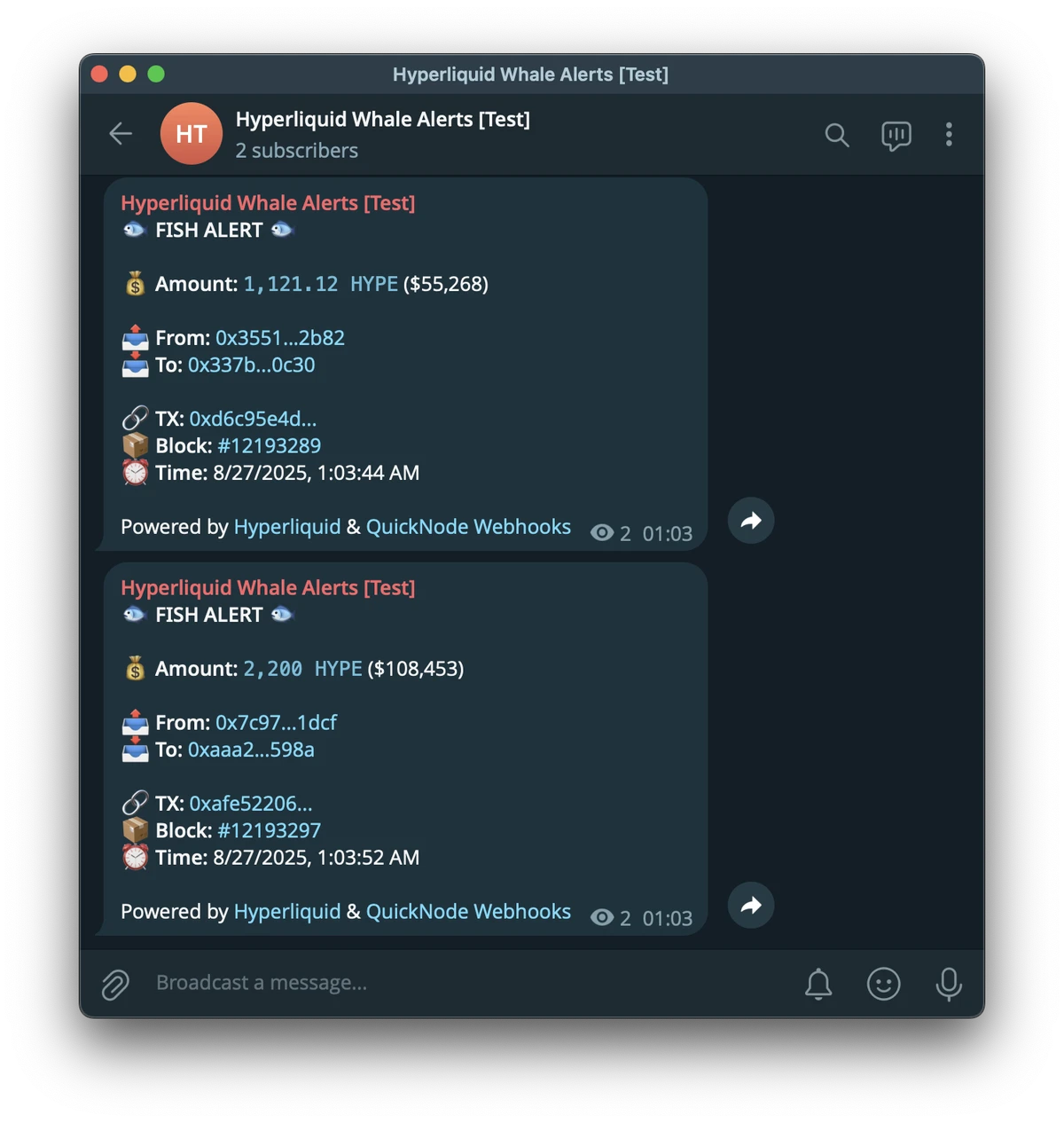
以下是最终警报的样子示例:
激活你的 Webhook
一旦你确认一切正常,点击 创建 Webhook 按钮来创建你的 Webhook。你的机器人现在已上线,并将实时监控所有新的 HYPE 转账。
故障排除
有时,如果你的服务器或 ngrok 没有正确关闭,你可能会在尝试重新启动时遇到类似地址已被占用的错误。以下是如何快速解决这个问题。
步骤 1: 释放端口
首先,使用端口找到进程 ID (PID),然后停止它。下面的命令适用于 macOS/Linux;它们可能因你的操作系统而异。
## 使用端口 3004 查找进程 ID (PID) lsof -i :3004 ## 将 <PID> 替换为你找到的数字并运行: kill -9 <PID> 步骤 2: 重启和更新
重启你的服务器和 ngrok。重要提示:ngrok 每次启动时都会创建一个新的 URL。你必须复制这个新的 URL 并将其更新到你的 QuickNode webhook 设置中。
结论
恭喜!你已成功构建了一个可用于生产环境的 Hyperliquid 区块链实时鲸鱼警报系统。通过结合 QuickNode Webhooks 的链上数据功能、用于业务逻辑的安全 Node.js 服务器和用于通知的 Telegram API,你创建了一个用于监控 DeFi 生态系统的宝贵工具。
这种模式非常灵活,你可以扩展层级,使用额外的链上上下文进行丰富,或者随着你的用例发展而交换数据源和目标。
下一步:生产部署
虽然 ngrok 非常适合开发,但你需要一个更持久的解决方案来用于生产环境。考虑将你的应用程序部署到:
- 虚拟机专用服务器 (VPS),例如 DigitalOcean 或 AWS,使用进程管理器(如 PM2)来保持其运行
- 使用 Docker 的容器化服务
- 平台即服务 (PaaS),例如 Heroku 或 Render
可能的改进
本项目提供了一个你可以扩展的坚实基础。以下是一些使你的机器人更上一层楼的想法:
Multi-Token 支持:修改代码以接受 token 地址数组。通过这种方式,你可以使用不同的阈值监控多个 token 并相应地发送警报。
历史数据仪表板:将传入的转账数据存储在数据库中(例如,PostgreSQL,MongoDB)。然后,你可以构建一个基于 Web 的 dApp 来可视化历史趋势,跟踪特定鲸鱼钱包的净流量,并执行更深入的链上分析。对于历史数据,请考虑使用QuickNode Streams,因为它支持回填。
添加更多通知渠道:集成其他通知服务,例如 Discord webhooks。
自动化交易触发器:对于更高级的用例,你可以使用这些警报来触发链上操作。例如,大型转账可以触发交换。
更多资源
- Hyperliquid 文档
- QuickNode Hyperliquid 指南
- QuickNode Hyperliquid 文档
- 视频: 什么是 Hyperliquid HyperEVM 以及如何入门
- 视频: 如何构建 Hyperliquid 分析仪表板
如果你遇到困难或有疑问,请在我们的 Discord 中提出。在 X (以前的 Twitter) (@QuickNode) 或我们的 Telegram 公告频道 上关注我们,以了解最新信息。
我们 ❤️ 反馈!
如果你有任何反馈或新主题的请求,请告诉我们。我们很乐意倾听你的意见。
- 原文链接: quicknode.com/guides/hyp...
- 登链社区 AI 助手,为大家转译优秀英文文章,如有翻译不通的地方,还请包涵~


